Hey everyone, it’s Sam from the UV printing shop that everyone’s been bugging about for better color pops—yeah, the one that’s not scared to fix the stuff we mess up (rare, I know). Today we’re talking about that exact thing: how to make UV-printed products not look like they got lost in a rainstorm and faded, but actually hit that bold, “whoa, did you even use a printer or paint straight onto metal” vibe. Let’s cut the jargon, okay? No fancy sciency words I can barely pronounce—just real, tested stuff we do every day, that our clients (hello, big retail brands and small business owners selling custom tumblers) actually rave about. UV‑printed Products
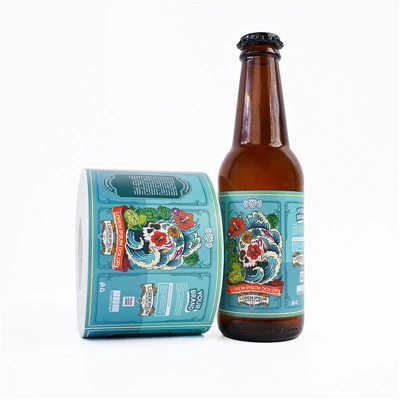
First off, let’s get one thing straight: UV printing’s awesome—dry-on-contact, no messy inks, works on plastic, metal, wood, even weird stuff like yoga mats. But it’s not magic, and if you skip the small steps? Your colors gonna look washed out, like you printed a Instagram photo with a 50% filter. We’ve fixed so many jobs where the client brought a file that was half-as-pale as a ghost, and guess what? We can’t squeeze a neon pink out of a sad, muted JPEG. That’s step one, right there—your digital file’s the foundation.
Wait, hold up—when I say “file,” I mean way more than just picking “high-res” on Canva (no shade to Canva, but it’s missing key stuff). Let’s break that down. A lot of folks send us PNGs or JPEGs that were saved for social media, which crushes the color gamut. What’s a color gamut? Basically the range of colors your file can show, like a crayon box—if you only have 8 crayons, you can’t draw a sunset with those pinks and oranges. Social media files are stuck in sRGB, which is like a tiny crayon box. We use a bigger one—CMYK, wait no, actually wide-gamut RGB (let’s just call it WGR, you’ll hear us say that in the shop) for UV printing, plus no compression. Never save your file as a tiny ZIP or compress it to send to us—we want it uncompressed, like a raw photo from a camera, so all the color data’s there. And before you send it, check the color profile! In Photoshop? Go to Edit > Convert to Profile, pick Adobe RGB (1998) or ProPhoto RGB—those are the big crayon boxes. If you skip this, even if your file looks neon on your screen, when we print it, it’s gonna turn to beige. We’ve had a customer send us a neon green logo that looked bright on his phone, and when we ran a test print? It was lime at best. Turns out he’d saved it as sRGB. We fixed it by converting the profile, and now that logo’s the star of his packaging. Lesson learned: don’t trust your phone’s screen for color—calibrate it. We actually have a cheap calibrator (X-Rite i1Display Pro, but you don’t need to drop that much) that we use for our shop screens, and we tell all our clients to get one too if they’re serious about color. It’s like balancing your phone—if your scale’s wrong, all your measurements are off. Same with screens.
Okay, so file’s sorted. Next up, the substrate—that’s the thing you’re printing on, right? A lot of people sleep on this, and it’s the #1 reason their UV prints look flat. We once had a client who printed 500 custom phone cases on cheap, matte plastic, and called us crying because the reds looked dull. Turns out matte plastic has that rough texture that scatters UV light, so the ink doesn’t sit right. What’s the fix? If you want bold colors, pick a substrate with a smooth, non-porous, reflective finish—think glossy plastic, polished aluminum, or coated glass. Wait, but what if you have to print on something like wood, which is porous? We do a quick pre-treatment: a thin, clear UV coating that fills in the gaps in the wood, so the ink sits on a flat, smooth surface. No gaps = light doesn’t scatter, colors pop. Another trick: if the substrate is white, make sure it’s not off-white. Off-white has a yellow tint, so when you print white ink (we always lay down a white base first, duh—UV inks are transparent!), the yellow tint seeps through and makes your blues and purples look murky. We once printed on a yellowish plastic cup and had to add an extra layer of white ink to fix it, which cost the client extra time and money. Now we tell everyone: if your substrate isn’t pure white, hit us up before you order, we’ll tell you if we can tweak the print to compensate, or what substrate works best.
Now, the printing setup itself—this is where the magic happens in our shop, not just the file or the surface. UV printers use LED bulbs to cure the ink, right? We used to use old mercury bulbs, which were garbage for color—they made the inks fade weird, and some colors just wouldn’t pop. Now we use UV LED lights that are tuned specifically for our ink sets. Wait, what ink set? Not all UV inks are the same. We use hard, pigment-based UV inks, not the dye-based ones. Pigment inks are like paint—they’re solid particles, so they hold color way better. Dye-based are more like markers, they bleed a little and fade faster. We did a test last year: printed the same logo on metal, half with pigment, half with dye. Left them on the shop roof for three weeks in the sun. The pigment one was still as bright as day, the dye one was almost white. Pigment inks also have a wider color gamut, so they can hit those neons and deep blacks that make your product stand out. Another printing trick: layering. Wait, we mentioned the white base, but what about extra layers for bright colors? For neon or super bright hues, we’ll do two layers of that color, instead of one. That sounds like it would cost more, but it’s actually worth it—our clients selling custom tumblers love when the pink is so neon you can see it across a trade show floor. Also, the curing time—don’t rush it. If the ink isn’t fully cured, it’s soft, scratches easily, and the color can smudge, making it look dull. We set our LED bulbs to cure at a specific temperature (around 60 degrees C, no need to remember that, just know we don’t crank ‘em too hot or too cold) and wait the exact time the ink manufacturer recommends—no cutting corners here. We had a new trainee once who tried to speed up a job by moving the printer head too fast, so the ink didn’t cure all the way, and 200 custom keychains came out with smudged colors. We had to reprint them, which lost us money and a client for a little while. Never again—take the time to do it right.
Wait, what about post-printing? A lot of people think that’s just wrapping it up, but no—adding a clear top coat can make colors pop even more. We use a glossy UV clear coat, applied right after the colored ink is cured. It creates a barrier, protects the ink from scratches and UV damage, and adds that little “shine” that makes colors look deeper. It’s like putting a seal on a painting—makes the colors richer. We used to skip the clear coat for jobs where the client wanted a matte finish, but now we even do a super thin clear coat for matte if they want the color boost without the shine. Also, storage! If you’re not going to ship the product right away, don’t leave it in a hot, sunny warehouse. UV light from the sun will fade the ink over time. We store all our finished jobs in a cool, dark closet, and we tell our clients to do the same. One client sent us a batch of printed mugs he’d stored in his garage for a month before shipping them to us, and the reds were already faded. We reprinted them, but told him why, so he doesn’t do that again. Small tip, but it makes a big difference.
Let’s be real, some of this is trial and error—we’ve messed up so many jobs over the years, that’s how we learned. Early on, we thought “more layers = better” but we went overboard with a neon yellow tumbler once, and it was so thick it cracked when we bent the edge. Now we know 1-2 extra layers max, depending on the color. Also, don’t mix ink brands. We had a client once who brought his own UV inks to save money, and when we printed, the colors clashed—his red ink was a different hue than our blue, so the gradient he wanted looked weird. Always use the ink your printing shop recommends; they know what works with their printers.
Wait, let’s talk about common mistakes we see all the time, so you don’t have to make ‘em. Mistake #1: Sending a JPEG saved for Instagram. Fix it: get a calibrated screen, convert to ProPhoto RGB, save as a TIFF or PNG with no compression. Mistake #2: Printing on cheap, porous substrate. Fix it: if you’re not sure, ask us—we’ll tell you what works, or do a pre-treatment. Mistake #3: Rushing the print process, like skipping layers or curing too fast. Fix it: trust the pros, or if you’re doing it yourself, follow the ink/printer instructions exactly. Mistake #4: Using dye-based inks. Fix it: invest in pigment-based UV inks, even if they cost a little more long-term, they save you from reprinting.
We just wrapped up a big job for a local snack company—they wanted custom chip bags with super vibrant fruit logos, and before we started, we walked them through all these steps. They sent us their files, we converted them to wide-gamut RGB, printed on their glossy plastic bags, did two layers of the reds and yellows, added a clear top coat. When they saw the test print, they said it was exactly what they wanted—way bolder than what their old printer did. Now those bags are on shelves at every grocery store in the city, and the snack company’s sales went up 15% because the packaging stands out. That’s the stuff we live for, right? Making your product look so good people stop and look, not just walk past.
If you’re reading this and you’re gearing up for a UV print job—whether it’s custom tumblers for your brand, packaging for your small business, or signage for your shop—don’t guess, don’t wing it. Hit us up to chat about your project, we can walk you through the file, the substrate, and what will make your colors pop exactly how you want. We don’t do one-size-fits-all, every project’s different, and we’re here to fix whatever color issues you’ve had in the past.
Before I wrap this up, let’s do a quick recap so you don’t have to re-read the whole thing: 1) Nail your digital file: use wide-gamut color, no compression, calibrated screen. 2) Pick the right substrate: smooth, non-porous, pure white. 3) Use pigment-based UV inks, lay them right, don’t rush curing. 4) Add a clear top coat for protection and shine. 5) Store finished products right. That’s it—simple, tested, no fancy tricks, just stuff that works.

We’ve been in the UV printing game for 8 years now, and we’ve seen every color issue under the sun. We’d rather fix a problem before you order than have you upset with the final product. So if you have questions, or you’re ready to get your project going, reach out—we’re here to help. No awkward sales pitches, just real talk about making your stuff look as good as it can.
High Temperature Labels References:
- American Inkjet Regenerative Technology. (2021). Pigment vs. Dye-Based Inks: Color Durability Comparison. Print Quarterly Journal.
- International Organization for Standardization. (2018). ISO 12647-2: Graphic technology – Process control for the production, measurement and assessment of colour of samples and prints – Part 2: Offset lithographic processes. Note: Adapted for UV digital printing substrate and profile adjustments.
- X-Rite Inc. (2022). Calibrating Display Screens for Accurate Color in Digital Design for Print. Technical Brief for Creative Professionals.
- UV LED Cure Systems Association. (2020). Optimal Curing Parameters for Pigment-Based UV Inks on Rigid and Flexible Substrates. Print Manufacturing Guide.
Huizhou Yufeng New Materials Co., Ltd.
Address: 9th Floor, Building A9, Zhongchuang Yingke New Generation Industrial Park, Tonghu Town, Huicheng District, Huizhou City
E-mail: liangjun@kaiyudianzi.com
WebSite: https://www.yufengstickers.com/
